
What PC Mouse are you using?
-
Logitech V450. Not a bad mouse but not brilliant. It was however just a couple of quid at a car boot sale last year and is a mile better than the generic corded thing I had in before.
When funds and or opportunity allow I'll upgrade to something a bit chunkier, most likely Logitech again as it takes me years to wear them out compared to months with lesser brands.
-
I just buy the cheapest thing in the shop everytime :)
-
Magic Mouse when I'm on OSX, Razer Imperator for gaming on Windows.
-
@Chako said:
A Logitech Performance MX...which drives me up the wall at times as I am constantly having to plug the darn thing in for battery recharging via a crappy cord systemI don't understand why you don't like that. I think it's the best charging system for a wireless mouse on the market, since you can still use the mouse while it's being charged.
-
looks like a far better system than my Logitech MX1000 Laser (the first logitech laser mouse iirc)
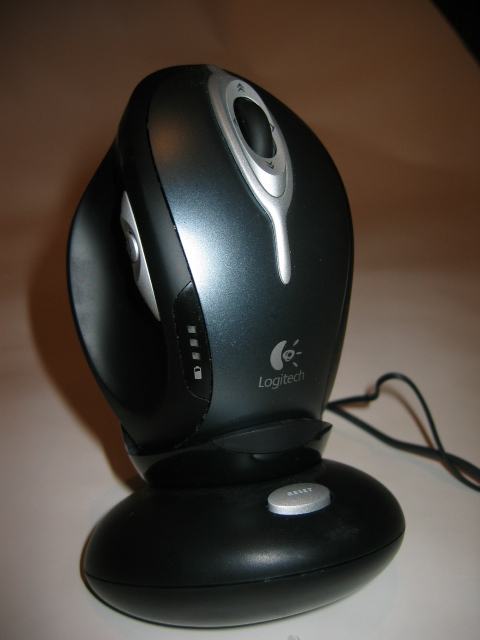
It has to sit just right to actually charge. I usually stuck something in to get just the right position, and any bump on the desk would stop it charging. (a very bad thing when you have 2 cats)
When I got a backup Logitech LS1 to use while it was recharging, it got to the point where one day I decided to just stop using the MX1000... the LS1 does a great job at a very reasonable price...
-
I got a fair amount of mileage off that mouse before I switched. The charging dock is still sitting on my desk, but the mouse is in a drawer. I'm a huge logitech fan... I have piles of their stuff...
-
@Reinier said:
I know, I have a Performance MX ánd an MX1000 :)
By the way if you send Logitech an email complaining about your MX1000 not charging correctly, they will probably send you a new one, no questions asked.That happened to my mother- she bought a dead one and since she lives 150kms from the store she bought it at she called Logitech customer service. They tried a couple of things to make it work over the phone then couriered her a new one. Great customer service is enough to make me a lifetime customer.
Def
-
I took a pic of mine, I can't find a model name or number just a part number. I saw these in a store about 6 months ago but haven't seen them since. I've used this mouse and this mouse alone for nearly 5 years and it is still going strong. I don't know that I will replace it until it actually dies.

-
Mine uses one AA battery that lasts forever. I can only remember changing it about 4 or 5 times. That's great battery life considering it's always on because i don't dock it.
-
I'm using one of the Apple 'magic mouse' with the touch surface on it. I use it primarily because I don't have enough USB ports on my MacBook Pro to use a cabled mouse. Also, it has the best responsiveness and connectivity of any bluetooth mouse I've ever used. It's not all strawberries and cream though... it chews up batteries (a fresh pair of eneloops about every other week), it doesn't have an autocharge ability, and the touch surface is too sensitive sometimes, hard to get really precise and fine control out of my cursor with it sometimes. It also sometimes confuses left and right clicks. I'd get a traditional two button mouse with a scroll wheel if I could find something that uses bluetooth that could connect reliably to my Mac and not have horrible lag. That's the single best thing about the Apple MM.
-
I have a new desktop Mac at work, and when we bought it, the store let us swap the included Magic Mouse for the Magic Trackpad. (I already had a Magic Mouse). I really love the large trackpad and wont be going back. I do a lot of website work and using the Magic Trackpad is like gliding on ice all day. The gestures take some getting used to, but not long.
http://www.apple.com/magictrackpad/ -
@Reinier said:
I know, I have a Performance MX ánd an MX1000 :)
By the way if you send Logitech an email complaining about your MX1000 not charging correctly, they will probably send you a new one, no questions asked.I just contacted them about my (7 years old!) MX1000 not working properly, they gave me 50% off on a Performance MX :D
-
In the computers that I had/have the option to use my own mouse I use Logitech; started with the non-optical ones (had to clean the ball and the trackers every so often) and moved to the optical ones. (note, I have large hands)
I like their operation and their "heft", and have learned to accept that they will cost more, but if you use them for 10 + years it does not really matter.
I have a cordless one too, for the Netbook, but I avoid the cordless ones because they are guaranteed to need new batteries or a charging just as you need to do something important and I am afraid of losing them, as I tend to lose anything not tied down..











Hello! It looks like you're interested in this conversation, but you don't have an account yet.
Getting fed up of having to scroll through the same posts each visit? When you register for an account, you'll always come back to exactly where you were before, and choose to be notified of new replies (either via email, or push notification). You'll also be able to save bookmarks and upvote posts to show your appreciation to other community members.
With your input, this post could be even better 💗
Register Login