
The Raspberry Pi
-
Just got this in..a Retroflag MegaPi case.


I did notice that they included a much nicer Phillips driver with the MegaPi case as opposed to that included with the NESPi case.

I haven't built the MegaPi system yet...but here is a shot of it next to the NESPi + case.

I also received this kit as well...but it came with a 3 B as opposed to the 3 B+ that was advertised. After doing a bit of research, there aren't many differences between the two so I have decided to not return it.


-
I just finished the install and I must say, this case was a bit more difficult to shoehorn everything in it. The MegaPi is slimmer and you have to install the Pi upside down. Minor difficulties occurred trying to bend the stiff power wires and also bend the two USB leads into such a tight space, made all the tighter due to the installation of the fan. The case is a lot nicer to look at once everything is pushed and coaxed into place. Love the better and larger card storage opened via the volume lever. The Ethernet and 2 USBs are hidden behind a corner of the case that slides off to expose them. There is a small hole that can be uncovered if you need to pass a cord through that removable corner piece.. Not as convenient as that found on the NESPi which are all on the front accessed via a very nice spring loaded trap door. A huge plus is the micro SD card slot that is hidden behind another spring loaded trap door. You have to get a fingernail under it to pry it open, but once opened, it stays as such. A nice touch...but an even nicer touch is the easier access to the SD cards. On the NESPi, it is difficult. On the MegaPi, the card sticks out a little more making it a lot easier to pull it out, and to also push one in. The NESPi card slot has room to push an SD card below the port, and into the case. They fixed that with the MegaPi as there isn't enough room for this to happen. I think the MegaPi just might be my favorite case so far. The NESPi does have a lot more room for air movement inside the case. I think it might be the better solution is you are thinking of overclocking the Pi as you could fit a larger fan assembly or heat-sink...if that is even needed. The MegaPi case however looks a bit more polished and decorative. The larger SD storage that can store multiple micro SD card adapters let alone a load of micro SD cards is a winner compared to the much smaller one found on the NESPi. To be fair, the NESPi can store around 10 micro SD cards...but the one on the MegaPi is on a totally different level.

Why do I feel like I should buy a couple more Raspberry Pi 3 B+ board and get a SNESPi and FamiPi cases to go along with the micro console collection.


-
While it's great they try and reduce the footprint as much as possible on the mini systems, a little breathing room wouldn't be a bad thing.
-
@Whoey said:
While it's great they try and reduce the footprint as much as possible on the mini systems, a little breathing room wouldn't be a bad thing. it looks pretty cool though 8)
I have been trying to decide which wireless controller would be best
any suggestions, I have heard the ones for Xbox and some of the Playstation controllers are just the thing but does anyone have a preference or is there any different brands that I haven't noticed that might be better Logitech is the brand I have for my PC and the one I have used but it has a wire and I would rather have a wireless one so I could sit back a bit further 
-
While it's great they try and reduce the footprint as much as possible on the mini systems, a little breathing room wouldn't be a bad thing.
it looks pretty cool though 8)I have been trying to decide which wireless controller would be best
any suggestions, I have heard the ones for Xbox and some of the Playstation controllers are just the thing but does anyone have a preference or is there any different brands that I haven't noticed that might be better Logitech is the brand I have for my PC and the one I have used but it has a wire and I would rather have a wireless one so I could sit back a bit further I have a wetek Bluetooth controller I picked up on amazon on sale, it also works as a pure usb controller if needed, most new controllers should be similar with a retropie setup
-
Thanks Whoey
 I'll give those a look

-
If you have access to newer bluetooth console controllers they should work.
-
I dont have any of the newer controllers :-\ that's why I was wondering
didn't want to buy something and it not work if I could ask first -
yup, go with whatever looks/feels/fits the budget right for you, if it's PC compatible it should be fine.
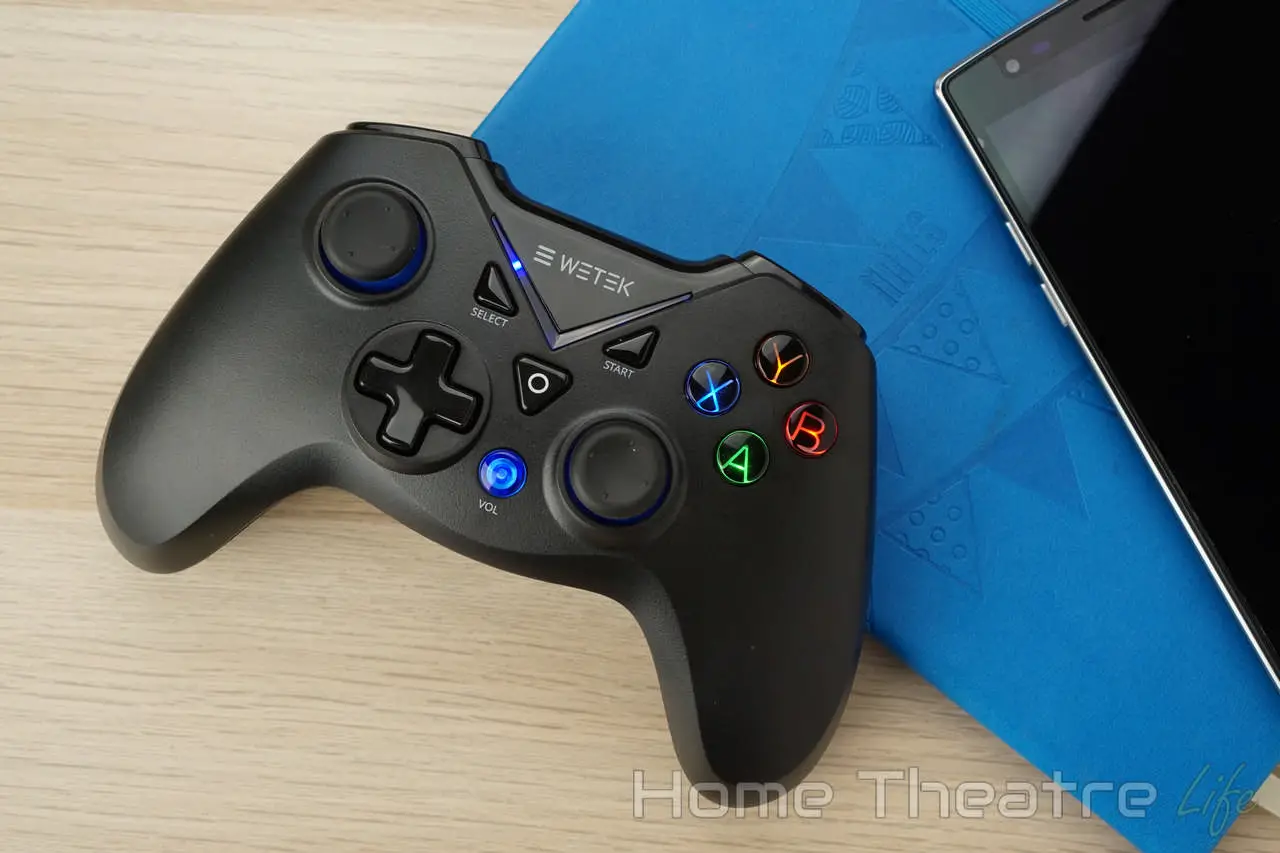
WeTek Gamepad Review: How Good is WeTek's Controller ?
WeTek Gamepad Review: The WeTek Gamepad is a Bluetooth controller compatible with both Android and Windows for under $40. Find out if it's worth it!

Home Theatre Life (hometheatrelife.com)
I got mine for less than half of what they say in that review, so I think it's a winner.
-
Well that case came in. At least the Pi B + didn't have to go in upside down like that SEGAPi case.

Two of the bottom screws are going to be hidden by rubber feet.

The place to hid extra micro SD cards is small...but so again are the micro SD cards.

So far, I have collected the following RetroFlag cases:
- NESPi (NES)
- NESPi Plus (NES with safe shutdown)
- MegaPi (SEGA with safe shutdown)
- SuperPi (Super NES with safe shutdown)
All I am missing is the Japanese Super Famicom case.
This goes with my other mini cases that are not Raspberry Pi driven such as the official NES mini, the official SNES mini, a knock off NES mini by Coolbaby, the SEGA flashback mini, the Atari 2600 flashback mini, the C64 mini, and the official Play Station Classic Mini.
Not sure why but I do like these little retro gaming consoles.
-
I just received a somewhat large package today...
Just got in the last of the RetroFlag cases...a SuperPi Case-J.
I get these cases from GeeekPi, and they always include a felt storage bag.

The packaging is printed to resemble the case inside.

Inside, the case is well protected.

Here is a photo of all of the RetroFlag cardboard boxes I have.

The inside of the SuperPi Case-J.

All of the RetroFlag cases have a built in Micro SD card storage. This case is very similar to the Super Pi Case-U which is basically a North American SNES. Press the eject button and the flap pops open via a spring mechanism.

The back of the case.

The Micro SD card slot. Time will tell if this is a good design compared to the other models.

Much like its sister case, the SuperPi Case-U, the Ethernet and 2 USB ports are hidden behind a removable door.

I also ordered a Wii U controller adapter after doing a bit of research. I found a Wii U Pro controller at one of the local pawn shops after viewing a video about how someone really thought it was the perfect controller for a RetroPi set up. However, after buying the controller, I looked further to find out how such a device worked and found out I also needed this adapter. Going to try this out later this week. If it works, could be my go to setup.

I was also curious to see if I could take one of my little Raspberry Pi s RetroPi computers to work and see if I could use the projector. Yeah, that didn't quite work as there is no HDMI hookup on the work setup. Found this and can't wait to see if I can use it with the projector. This HDMI to VGA adapter could be the thing I needed for this to work.

I also found out that having a USB full size keyboard is a pain to use and store away. I am hoping this will work better.

Looking to populate the last RetroFlag case with another Raspberry Pi 3 B+, I got one of those limited time deals pop up on screen. That was a first for me. This deal looked real good as it was only 10 dollars more than the CanaKit 3 B+ with non on/off power supply. I always like to get the ones with the built in switch. This kit came with the wanted power supply, plus another HDMI cable, a clear plastic case, two copper heat-sinks, a micro SD to USB adapter, and a 16gb micro SD card. For an extra 10 bucks, I deleted the usual kit for this one. I had never heard of ABOX, but the cardboard case it came in is very thick and sturdy.

Sliding the top off, you see the Raspberry Pi board in its own foam cutout and box.

Under the motherboard is the plastic case and manual on one side, and all the other goodies in another cardboard insert.

The case is one of those clear acrylic deals. I bought a separate Pi 3 B to inhabit this case.

Here are all the other goodies.

And last but not least, a Pi 3 B for that clear plastic case.


I plan on building both systems later this week. Should be fun.
-
The RetroFlag SuperPi Case-J is a little different in regards to the installation of the Raspberry Pi and fan. I found that I could not install the fan without removing one of the daughter boards.


At least the Pi does not install upside down like it does in the SuperPi Case-U.

And it is official, I absolutely hate that clear case the ABOX kit comes with. Not only was it fiddly to install, it really does nothing to protect the motherboard. I think the SuperPi Case-J is my favorite design so far in terms of looks.


-
Given that you have most of the systems there probably won't be much need to swap sdcards as you can probably run each one as the system it is rather than the jukebox type setup that retropie is intended to be.
I'm still on the fence with most of these cases, I think I may end up with some sort of Marvin the paranoid android or similar setup with all the guts in it for a google box or alexa or both.
-
would be neat to see a setup where the core retropie system runs on the sd card (and thus not needing removal) and the library/cartridges are actually USB sticks...
-
@Whoey said:
would be neat to see a setup where the core retropie system runs on the sd card (and thus not needing removal) and the library/cartridges are actually USB sticks...I have mine setup like that
Just put all my games on the stick and kept the micro SD in the Pi and just swap the stick in and out if I had to add any games I had a triple boot system on it as well, it had Retropie, Kodi and a GUI I do really like all these cool cases though and need to get the Pi back out and mess with it :ahhh I haven't had it out in a while and need to get reacquainted with it
-
Last time mine was out I was trying to setup a homebrew google assistant, as mentioned, it kinda worked, but perhaps not the way I would have liked it to.



Hello! It looks like you're interested in this conversation, but you don't have an account yet.
Getting fed up of having to scroll through the same posts each visit? When you register for an account, you'll always come back to exactly where you were before, and choose to be notified of new replies (either via email, or push notification). You'll also be able to save bookmarks and upvote posts to show your appreciation to other community members.
With your input, this post could be even better 💗
Register Login


