Thinking of getting into building a new PC system.
-
Dang, that’s just nuts, now if it ends up in Alabama before coming up and then you send it back or it somehow ends up going back it will have made a star trip! Lol..
JR
"The-Mad-Plumbarian" The Punisher Of Pipes!!! JR
**As I sit on my Crapper Throne in the Reading Room and explode on the Commode, thinking, how my flush beat John’s and Jerry’s pair? Jack’s had to run for the Water Closet yet ended up tripping on a Can bowing and hitting his Head on the Porcelain God! **🚽

-
Well it’s here! Someone’s going nuts! Here’s him opening it up..
JR
"The-Mad-Plumbarian" The Punisher Of Pipes!!! JR
**As I sit on my Crapper Throne in the Reading Room and explode on the Commode, thinking, how my flush beat John’s and Jerry’s pair? Jack’s had to run for the Water Closet yet ended up tripping on a Can bowing and hitting his Head on the Porcelain God! **🚽
-
I must say this thing is nasty! It weighs almost 30lbs, matte black case, with a tempered glass side, the led lights in the freaking thing you can do just about anything to, the one round on you can make spin, either way, or do in waves, the ones that go around the case again you can make them go like back and forth, in waves, or even breath, heck you can even set it up to dance with what music you have playing! And in any color, but of course we went with all red and the one round one spins! Totally cool!! I think we counted 7 cooling fans,,
JR
"The-Mad-Plumbarian" The Punisher Of Pipes!!! JR
**As I sit on my Crapper Throne in the Reading Room and explode on the Commode, thinking, how my flush beat John’s and Jerry’s pair? Jack’s had to run for the Water Closet yet ended up tripping on a Can bowing and hitting his Head on the Porcelain God! **🚽
-
Miscount! Missed two others, so a total of 9 fans!
He’s playing his first game now, red day redemption, I must say it is running so fast, and yet it shows that the liquid cooling core is running at 34° while the rest is at 54°!
This thing is just wow!
JR"The-Mad-Plumbarian" The Punisher Of Pipes!!! JR
**As I sit on my Crapper Throne in the Reading Room and explode on the Commode, thinking, how my flush beat John’s and Jerry’s pair? Jack’s had to run for the Water Closet yet ended up tripping on a Can bowing and hitting his Head on the Porcelain God! **🚽
-
Parts from China arrived, so that means upgrade.

Old PeeCee:


New PC time. :ahhh :ahhh

What a mess.


Such a cool case to look at.

I checked, it fits inside the old case.
Very happy with it. I didn't need the portability, but I'm in love with it.

(Aside from the cable "management" process. ) -
I have just added an armed guard...
<a href="https://flic.kr/p/2kNmvLD" target="_blank" rel="noopener noreferrer"><img src="https://live.staticflickr.com/65535/51064032337_642b7af889_4k.jpg" alt="banner" style="max-width: 100%; height: auto;" /></a>20210322_165203A by Chako, on Flickr
<a href="https://flic.kr/p/2kNm3Jb" target="_blank" rel="noopener noreferrer"><img src="https://live.staticflickr.com/65535/51063941366_b436858061_4k.jpg" alt="banner" style="max-width: 100%; height: auto;" /></a>20210322_165216A by Chako, on Flickr
<a href="https://flic.kr/p/2kNm3GY" target="_blank" rel="noopener noreferrer"><img src="https://live.staticflickr.com/65535/51063941296_7981619dd5_4k.jpg" alt="banner" style="max-width: 100%; height: auto;" /></a>20210322_165237A by Chako, on Flickr
The best part, I have him looking at me while I am sitting at the desk.
-
Hey Chako, I had to show the kid your idea and he liked it, since he his system is all black and red I said maybe he should do the same and put a deadpool in, anyway this is what he said,,
JR
"The-Mad-Plumbarian" The Punisher Of Pipes!!! JR
**As I sit on my Crapper Throne in the Reading Room and explode on the Commode, thinking, how my flush beat John’s and Jerry’s pair? Jack’s had to run for the Water Closet yet ended up tripping on a Can bowing and hitting his Head on the Porcelain God! **🚽
-
I noticed a spare spot on the computer and thought it was high time I filled it. Seeing as I already have a 1/6 scale soldier sitting on my graphics card for a while now, it was time to find him a friend.
The first guy doing guard duty since March of 2021.
<a href="https://flic.kr/p/2n4PHXM" target="_blank" rel="noopener noreferrer"><img src="https://live.staticflickr.com/65535/51895445583_40d0c83258_4k.jpg" alt="banner" style="max-width: 100%; height: auto;" /></a>20220221_120906A by Chako, on FlickrMeet the new guard...a Chinese UN blue helmet.
<a href="https://flic.kr/p/2n4Phdd" target="_blank" rel="noopener noreferrer"><img src="https://live.staticflickr.com/65535/51895358956_6b28ffd43f_4k.jpg" alt="banner" style="max-width: 100%; height: auto;" /></a>20220221_120900A by Chako, on FlickrI was going to get a sniper with a Gillie suite, but figured it would be a nightmare to add all that grass to the suite mesh. This guy is super detailed, even more so than the first one, and I was doubtful if that was at all possible. Both are now standing guard duty over my PC.
<a href="https://flic.kr/p/2n4Phbz" target="_blank" rel="noopener noreferrer"><img src="https://live.staticflickr.com/65535/51895358861_910b580903_4k.jpg" alt="banner" style="max-width: 100%; height: auto;" /></a>20220221_121332A by Chako, on Flickr -
Pretty cool. They are really detailed.
-
The saga continues. I just replaced my Asus 1660 Super with an Asus KO 3060 Ti. There is nothing wrong with the older card other than it was missing a few new technologies. Noticed the prices are getting lower, and the advances of this newer card over the older one meant it was time to upgrade. Other than that, the computer build which is now 3 years old continues to go strong. Thinking of possibly upgrading my motherboard and CPU down the road. The MSI B450 Tomahawk Max and AMD Ryzen 5 3600X is starting to get a bit long in the tooth, although there really isn't a great need to upgrade those at the moment.
-
Looks like I am upgrading my computer system again. I was thinking of upgrading to the newer AM5 environment....but I have had a few fun runs in my research. I post this here in case anyone is thinking of upgrading their computer systems from an AM4 to an AM5 ecosystem. My journey thus far has been a bit interesting to say the least.
As mentioned above, I upgraded my GPU around last Christmas time. I wanted something that could do a little more heavy lifting in terms of games from my older Nvidia 1660 Super GPU. To be frank, I haven't noticed much of a difference between the newer Nvidia 3089 Ti to the older card. I am still playing at 1080P, but at least I can activate some of the newer Nivida feature...so that is a good thing.
Well let me preface this by saying the whole upgrade thing was driven by my need for more storage. I was perusing Amazon.ca and noticed that NVMe gen 4 drives are a lot cheaper than they were back in 2020. At the time, I was able to get a 500Gig one for my operating system...which so far has been ok. My main issue is that I tend to play PC games on STEAM. At the time, I was only able to buy a 500Gb SSD drive for my main game storage. I do have a 4Tb HD for images, etc. At the time, I didn't know much about NVMe, it was fairly new, and the prices were high. Faster than SSD and faster than the old HD rotating platter drives as well. Howeve, I have found that modern AAA game titles eat up 500Gb like there is no tomorrow. This means I am constantly having to uninstall games for newer one. They are still on my STEAM, I just can't play but a few larger game titles at the same time. I lived with this limitation for a couple of years now, and it is getting old. As I mentioned, I saw recently that NVMe drives are a lot cheaper, and now they are gen 4 as opposed to my gen 3. I bought a Corsair gen 4 2Tb NVMe drive off of Amazon, thinking I can swap it for the 500Gb one I currently have...see...my MSI B450 Tomahawk Max only featured the one NVMe drive slot. I did a quick change only to remember that this smaller XPG one I already had was for my OS. I recalled that the STEAM games are on a 2.5" SSD drive installed inside my computer. Ah...so much for good intentions and a forgetful mind. Anyhow, that did not fix my issue, and I now have a nicer drive in its box waiting to be used...which kicked off this round of upgrading.
So the first thing I do is research everything I can. I even go as far as to stalk online forums to glean useful bits of information. First order of the day is to find out the differences between AM4 and AM5. It didn't take me long to find out that DDR5 is the only memory that AM5 uses. So much for being able to use my current DDR4 RAM modules. I also found out that AM5 processor are different to the older AM4 processors. The pins are now on the motherboard as opposed to being on the CPU. So far, I know I will need new memory and a new CPU. I already knew I was going to get a new motherboard...but what fun THAT was...foreshadowing insert here.
I then look at what can my current system do, and quickly found out that a Ryzen 7 5800x3D was the top cpu for AM4. It is very fast, and cost 430 Canadian. It would not solve my current storage issues. Besides, I don't feel that sinking that much money into a CPU on a dead end of the line system was worth it. So far, AM5 or bust!
I then looked into AMD's 3D gamer oriented CPUs. I quickly found out there is a lot of misinformation, rabid fans, and whatnot out there. It took a lot of reading and researching to find out what is what, and as far as I can tell, the extra level 2 cache that the 3D chips really helps CPU intensive games a lot. However, at the cost of general computing. You get nothing for nothing, and I found out that all of the 3D Ryzen chips are not as good at multitasking as the regular Ryzen CPUs. Ok...still a little confuse on what is what, and I haven't decided on what CPU I will land on just yet. Thus far, it might appear to be between a Ryzen 7 7800x3D, and a Ryzen 9 7900X. I am tending towards the Ryzen 9 as it has more cores, better at daily computer task, not that much slower than the 7800x3D, and it is right now cheaper than the 3D chip by 30 dollars locally. Still up in the air on what CPU I am going with at the moment though. I haven't purchased on as of yet. By the way, when AMD used an "x" on the end of the chipset, that means it is a bit faster than the regular non x variant out of the box.
Early in my research, I came across several references that you can use a cpu cooler from an AM4 system on the newer AM5 system...so I didn't think anything of it...that is until I noticed during the fun of looking at motherboards. I noticed that the AM5 system has a back metal plate. Sure enough, when I looked into my liquid cooling set up, I would have to purchase an AM5 mounting bracket. I just ordered that today off of Amazon. That was a got cha for me that blind sided me despite all of my research.
Now onto motherboards...and what a mess it is.For the AM5 family, there are no less than 4 motherboard chipsets to contend with. There is the lowest end B650, the higher b650E (e = extreme...I kid you not). Then there is the higher x670, and the top end x670E motherboards. This is what through me for a loop. After a ton of reading and trying to comprehend, the big difference is support the NVMe gen 5 drives and GPU x16 slot(s). From what I know, the biggest baddest and stupidly expensive GPUs are only gen 4 thus far. I don't see that changing anytime soon. I think there are a few gen 5 NVMe drives out right now, but they are very expensive. So to my thinking, any support for Gen 5 is supposedly to future proof yourself. Ok...that I can understand. Now this is what got me. It is up to the manufacturer to support what they want on their chipsets. So you can have a lower chipset such as the B models having support for a single gen 5 NVMe drive. The B650 boards mostly do not support gen 5 anything. The extreme variants tend to give you more support for the most part. At this point in time, not sure if gen 5 is important. But that could change in a couple of years.
What surprised me more is the price of AM5 motherboards. Everytime I saw a nicely priced motherboard, it tended to be for Intel. After much digging, I found that DDR5 is more expensive to implement along with gen 5 drive and GPU stuff. Most of the higher end boards tend to give you top end 8 layer motherboards that is a requirement to isolate signals for these faster things. So the price of AM5 motherboards are steeper compared to Intel at the moment.
I also noticed that most of these boards now offer 2-8 pin CPU power. I looked at my Thermaltake 750W power supply and only found it supports 1-8 pin power plug (2-4s as the older format was a single 4 pin). Now we are up to 16 pins...wow. I tore the internet apart trying to find out information on this, and it was confusing. I eventually ended up buying a newer power supply that supports this newer motherboard powering norm. This should come in tomorrow...my first computer part for this new build. I did eventually find, after reading some motherboard manuals via PDF that you only need the 1 to power your system...unless you plan on overclocking or you get one of the higher end more power hungry cpus. General consensus is you can get away with 1-8pin, but if you have both, use them as it ensures more even power distribution. I found this out only after buying the new power supply...but at least the new one is covered in terms of having more cable options, and it is an 850W supply...so a nice upgrade to what I currently have, despite my thinking I wouldn't have to upgrade it in the first place.
I wanted something a bit different, and thought a white build might be different enough. This limited my motherboard choices which I think is a good thing as there are too many options that span the 4 chipset variants. The prices are confusing as well, as sometimes, the b650 boards were more expensive than the x670 boards. If you want to go down a rabbit hole, try researching a new AM5 motherboard. I ended up buying an Asrock x760E Steel Legend. I could not find this board on Amazon.ca, so I ended up buying off of Newegg.ca. Just waiting for it to grace my door whenever it comes in.
The will be my first Asrock motherboard. I found out that Asus is having some major issues with their Bios. Folks having booting issues, etc. This is not just with Asus, as a lot of early adopters were having the same issues. I am hoping by now that there are fixes implemented. My online research hasn't found much more recent online complaining. Also, there was an issue with EXPO enabled overclocking of memory damaging cpu and motherboards...as in heating enough to start a fire. New Bios roll outs have neutered AMD EXPO settings from what others have mentioned. As far as I know, maybe this is not an issue anymore and they fixed it. As I don't overclock, I hope this will not be an issue with my build.
After buying the Asrock X670E Steel Legend, I noticed that the motherboard sound only has a mic in, a line out, and an optical. Ummm...how do you hook up a 5.1 system? Once again I researched and a whole lot of confusion once again. I eventually decided to read the PDF instruction manual and I am good. It appears you have to plug one of your cables into the front sound port of your case. A bit odd, but it should work. This after I started looking at sound cards. I was thinking...do I need to buy one in this day and age? Glad I found out the answer before buying a new sound card.
So far, I have the motherboard and power supply figured out and bought. Now researching memory modules and CPU...but I think I might have the CPU figured out at the moment. Now I just have to look at the QVI list to make sure the memory I buy will work with the motherboard. I find it interesting that you can get insane memory on the AM5 as DDR 5 support up so 128Gb of RAM. I thought I was doing well with 8-8Gb RAM modules. I am thinking 2-32Gb modules even though 32Gb is overkill for the most part.
So there you have it. My usual research to death, and sometimes get blind sided by things you don't think to look up. I am trying to eliminate that build where you have everything and something rears its ugly head and prevents you from continuing...looking at you CPU water cooling AM5 bracket.
-
Forgot to mention I upgraded my motherboard recently. I was using a SteelSeries Apex 3 TKL motherboard. My main issue, there is a small Caps lock indicator but I could not see it activated because it was hiding behind one of the keys. I decided to buy an Epomaker TH80 Pro mechanical keyboard with Gateron Yellow Pro linear switches. I absolutely love how this keyboard sounds and feels. My only issue, I tend to do a lot of gaming in a dark room...and I miss seeing the key labels shine through on the RGB. I think down the road, I just might buy some shine through keycaps to fix this issue.
<a href="https://flic.kr/p/2oTMdMv" target="_blank" rel="noopener noreferrer"><img src="https://live.staticflickr.com/65535/53094505783_8ebc5d339e_4k.jpg" alt="banner" style="max-width: 100%; height: auto;" /></a>20230729_171525A by Chako, on Flickr
<a href="https://flic.kr/p/2oTMdMk" target="_blank" rel="noopener noreferrer"><img src="https://live.staticflickr.com/65535/53094505773_9a3381c49b_4k.jpg" alt="banner" style="max-width: 100%; height: auto;" /></a>20230729_171544A by Chako, on Flickr
<a href="https://flic.kr/p/2oTJK8e" target="_blank" rel="noopener noreferrer"><img src="https://live.staticflickr.com/65535/53094022511_33210b40e8_4k.jpg" alt="banner" style="max-width: 100%; height: auto;" /></a>20230729_171610A by Chako, on Flickr
<a href="https://flic.kr/p/2oTKCG4" target="_blank" rel="noopener noreferrer"><img src="https://live.staticflickr.com/65535/53094195979_1311830694_4k.jpg" alt="banner" style="max-width: 100%; height: auto;" /></a>20230729_171653A by Chako, on Flickr
<a href="https://flic.kr/p/2oTKCG9" target="_blank" rel="noopener noreferrer"><img src="https://live.staticflickr.com/65535/53094195984_8dcdaddf69_4k.jpg" alt="banner" style="max-width: 100%; height: auto;" /></a>20230729_171832A by Chako, on Flickr
<a href="https://flic.kr/p/2oTLLTD" target="_blank" rel="noopener noreferrer"><img src="https://live.staticflickr.com/65535/53094418675_c9d3ea0a81_4k.jpg" alt="banner" style="max-width: 100%; height: auto;" /></a>20230729_171838A by Chako, on Flickr
-
Just checked with the QVL list for the motherboard and decide to get G.SKILL Trident Z5 RGB 2x16Gb DDR5 RAM modules. These have a rating of 6000 CL30-40-40-96. My first time going with G.Skill anything. Should be interesting. Just waiting on the motherboard to arrive, the CPU cooler adaptor, and the memory. I am thinking I might buy the cpu locally...and still struggling with the CPU options. The Ryzen 7 7800x3D is 30 dollars more expensive, but really boost some games due to the massive amount of cache onboard. The higher level Ryzen 9 7900X has more cores and is 3 dollars cheaper, but runs hotter overall, is better at productivity stuff. Pros and Cons all around. This one is giving me a headache at the moment. I figure I should have this last piece of the puzzle figured out by next paycheck. Hopefully everything will come together before August ends.
-
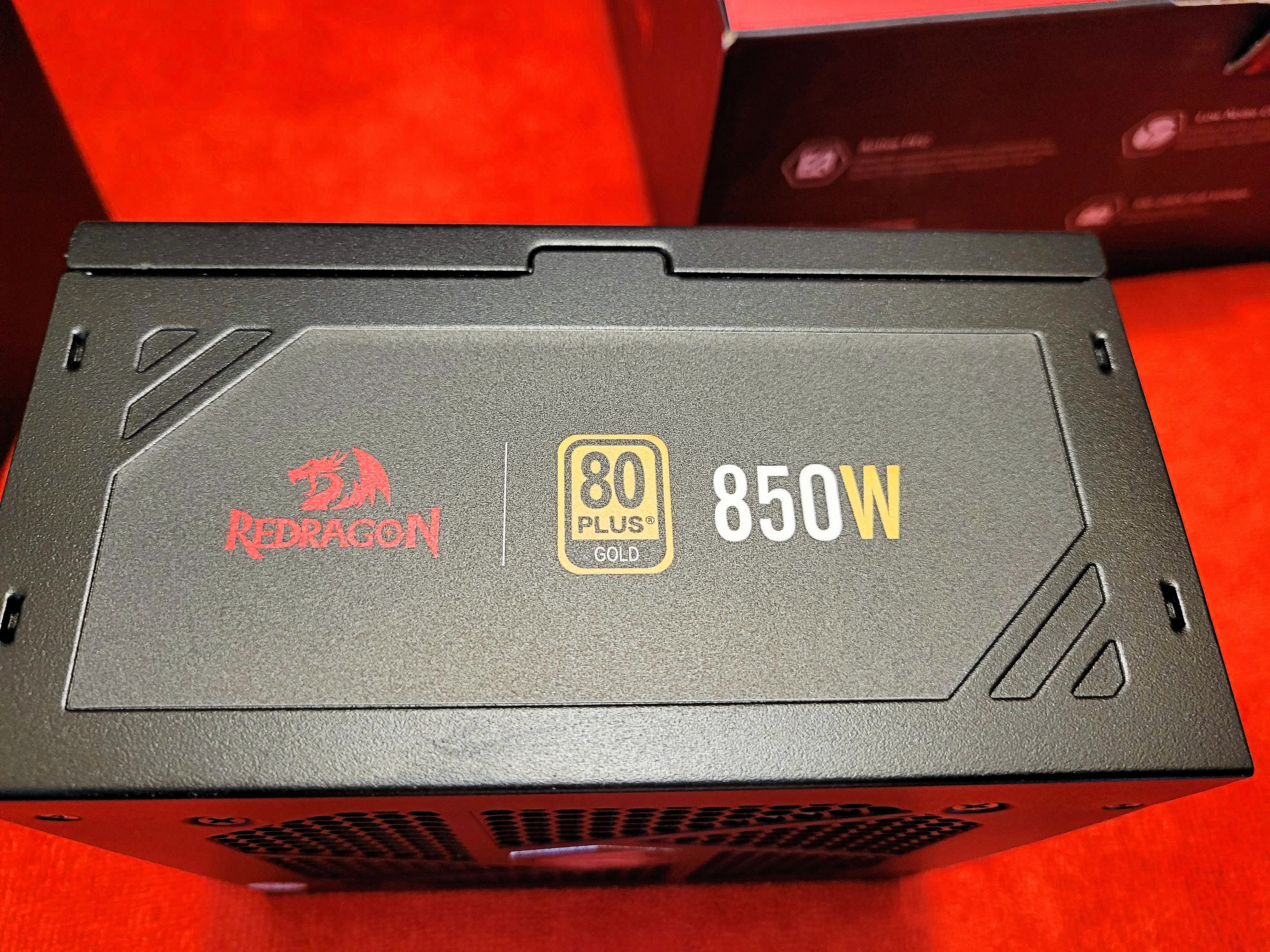
Just got in the new power supply. Thankfully it is the right model. I had to call Amazon.ca as I originally wanted a white PSU but found out later that night that the white was only 600W and not this one that I was eyeing. That and I wanted something with twin 8 pin CPU cables.
<a href="https://flic.kr/p/2oTWapC" target="_blank" rel="noopener noreferrer"><img src="https://live.staticflickr.com/65535/53096250430_a7f044f394_4k.jpg" alt="banner" style="max-width: 100%; height: auto;" /></a>20230805_164257A by Chako, on Flickr
First time I bought a power supply that came with a jumper tool to test it out before building your system.
<a href="https://flic.kr/p/2oTRdnP" target="_blank" rel="noopener noreferrer"><img src="https://live.staticflickr.com/65535/53095284857_bbfaab32f4_4k.jpg" alt="banner" style="max-width: 100%; height: auto;" /></a>20230805_164453A by Chako, on Flickr
Opening the box.
<a href="https://flic.kr/p/2oTWaoL" target="_blank" rel="noopener noreferrer"><img src="https://live.staticflickr.com/65535/53096250380_2e933a4984_4k.jpg" alt="banner" style="max-width: 100%; height: auto;" /></a>20230805_164512A by Chako, on Flickr
It comes with a cheesy sticker sheet.
<a href="https://flic.kr/p/2oTWap2" target="_blank" rel="noopener noreferrer"><img src="https://live.staticflickr.com/65535/53096250395_9bc7a371c5_4k.jpg" alt="banner" style="max-width: 100%; height: auto;" /></a>20230805_164524A by Chako, on Flickr
The manual appears nice.
<a href="https://flic.kr/p/2oTWCof" target="_blank" rel="noopener noreferrer"><img src="https://live.staticflickr.com/65535/53096341178_62b576038f_4k.jpg" alt="banner" style="max-width: 100%; height: auto;" /></a>20230805_164606A by Chako, on Flickr
<a href="https://flic.kr/p/2oTV2hX" target="_blank" rel="noopener noreferrer"><img src="https://live.staticflickr.com/65535/53096028019_6536c13216_4k.jpg" alt="banner" style="max-width: 100%; height: auto;" /></a>20230805_164633A by Chako, on Flickr
<a href="https://flic.kr/p/2oTWCo5" target="_blank" rel="noopener noreferrer"><img src="https://live.staticflickr.com/65535/53096341168_1e4880dbd6_4k.jpg" alt="banner" style="max-width: 100%; height: auto;" /></a>20230805_164648A by Chako, on Flickr
Digging further.
<a href="https://flic.kr/p/2oTU6xE" target="_blank" rel="noopener noreferrer"><img src="https://live.staticflickr.com/65535/53095847216_347a61c5af_4k.jpg" alt="banner" style="max-width: 100%; height: auto;" /></a>20230805_164717A by Chako, on Flickr
The back of the psu with all of the modular hookups.
<a href="https://flic.kr/p/2oTWCnJ" target="_blank" rel="noopener noreferrer"><img src="https://live.staticflickr.com/65535/53096341148_0f9017361c_4k.jpg" alt="banner" style="max-width: 100%; height: auto;" /></a>20230805_164835A by Chako, on Flickr
The side.
<a href="https://flic.kr/p/2oTU6xj" target="_blank" rel="noopener noreferrer"><img src="https://live.staticflickr.com/65535/53095847196_4bbf5eaefe_4k.jpg" alt="banner" style="max-width: 100%; height: auto;" /></a>20230805_164846A by Chako, on Flickr
The back with a smart fan control button and one for the built in RGB.
<a href="https://flic.kr/p/2oTWao5" target="_blank" rel="noopener noreferrer"><img src="https://live.staticflickr.com/65535/53096250340_8c1f5c8d84_4k.jpg" alt="banner" style="max-width: 100%; height: auto;" /></a>20230805_164857A by Chako, on Flickr
The glowy fan part.
<a href="https://flic.kr/p/2oTWCnd" target="_blank" rel="noopener noreferrer"><img src="https://live.staticflickr.com/65535/53096341118_012fe762aa_4k.jpg" alt="banner" style="max-width: 100%; height: auto;" /></a>20230805_164910A by Chako, on Flickr
A lot of cables come with this unit.
<a href="https://flic.kr/p/2oTWano" target="_blank" rel="noopener noreferrer"><img src="https://live.staticflickr.com/65535/53096250300_a4c3cf0a83_4k.jpg" alt="banner" style="max-width: 100%; height: auto;" /></a>20230805_165003A by Chako, on Flickr



 cool!


Hello! It looks like you're interested in this conversation, but you don't have an account yet.
Getting fed up of having to scroll through the same posts each visit? When you register for an account, you'll always come back to exactly where you were before, and choose to be notified of new replies (either via email, or push notification). You'll also be able to save bookmarks and upvote posts to show your appreciation to other community members.
With your input, this post could be even better 💗
Register Login