Thinking of getting into building a new PC system.
-
I will take photos of the build as I go like I did with the last one.
I will say, I am currently non-plussed at the moment. I went upstairs and looked in all of my packaging from the last build and could not find any literature. I must have stored it somewhere else...and I have looked in all of the obvious spaces short of looking in my case box. My worry is that I cannot find my windows key for the operating system. I was able to use the Notepad trick after researching online and was able to get my OS key incase I need it for this build. However, I should have that info upstairs but I cannot find it right now. At least I now have my key written on a piece of paper. I also made a USB boot drive for the OS. I hope that is all I need. Mind you, not sure if everything is tied into my Microsoft Account anyways and I may not need the key.

I checked and current prices for Windows 11 Pro is 265 Canadian. Home is around 190. I hope I do not need to purchase one.
-
Did you get the build made yet or waiting for the weekend

-
Just bought another Corsair MP600 gen 4 2Tb drive for the computer. This should arrive on the 30th of August. I was not going to upgrade the 500Gb gen 3 drive for the OS, but might as well. I was going to give it a gen 4 1Tb drive but for a little more, may as well get another 2Tb drive. So the build should happen the first of September.
-
You can never have enough space


-
True. The whole reason for this upgrade was to expand storage. I thought buying the first 2Tb drive would replace my 500Gb drive. When I made the replacement, I quickly realised that was not my STEAM drive but my OS drive, I forgot that I was using a 2.5" SSD 500Gb drive inside my case as my STEAM drive. A couple of years ago, these drives were expensive. I made sure to get a motherboard with more than the 1 NVMe drive this time around. These Corsair MP600 2Tb drives were over 400 Canadian when they came out a few years ago.
The plan is to remove that very limiting 500Gb 2.5" internal Samsung SSD that is used for my STEAM drive. I have 4 NVMe drive spots on this motherboard. I will have 3 Corsair NVMe gen 4 drives. Not sure if I will keep my current Gen 3 500Gb drive to populate that last spot...or not. I am going to use my traditional 4Tb HD for file storage in this new build...but that should be my only SATA drive.
-
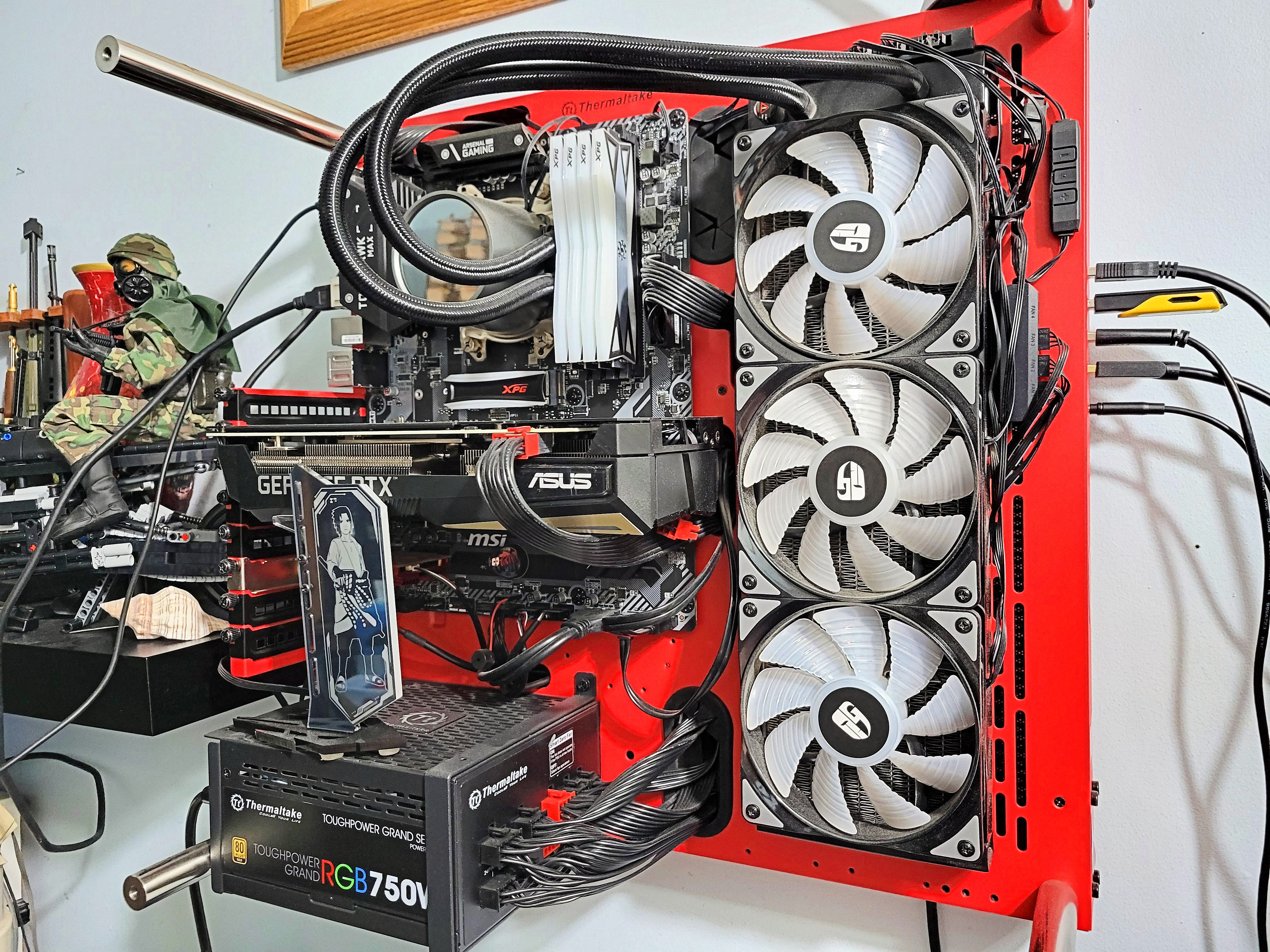
One last look at the old system. I just took off the tempered glass front and the top fan array.
<a href="https://flic.kr/p/2oYfTUg" target="_blank" rel="noopener noreferrer"><img src="https://live.staticflickr.com/65535/53145171379_818502be1c_4k.jpg" alt="banner" style="max-width: 100%; height: auto;" /></a>20230827_095849A by Chako, on Flickr
<a href="https://flic.kr/p/2oYhk8p" target="_blank" rel="noopener noreferrer"><img src="https://live.staticflickr.com/65535/53145451353_7d45b38b4b_4k.jpg" alt="banner" style="max-width: 100%; height: auto;" /></a>20230827_095858A by Chako, on Flickr
It is a shame this power supply did not have all of the correct connections that newer systems are now asking for.
<a href="https://flic.kr/p/2oYfTU1" target="_blank" rel="noopener noreferrer"><img src="https://live.staticflickr.com/65535/53145171364_29e2764c08_4k.jpg" alt="banner" style="max-width: 100%; height: auto;" /></a>20230827_095910A by Chako, on Flickr
<a href="https://flic.kr/p/2oYhk7T" target="_blank" rel="noopener noreferrer"><img src="https://live.staticflickr.com/65535/53145451323_768692cdf6_4k.jpg" alt="banner" style="max-width: 100%; height: auto;" /></a>20230827_095920A by Chako, on Flickr
I have a funny feeling I will be buying another pair of RAM modules to fill up the empty spots, which is what I did here on this build.
<a href="https://flic.kr/p/2oYbPBj" target="_blank" rel="noopener noreferrer"><img src="https://live.staticflickr.com/65535/53144376492_ca5f9bb8cb_4k.jpg" alt="banner" style="max-width: 100%; height: auto;" /></a>20230827_095928A by Chako, on Flickr
Surprisingly not much dust on this open air system. I would attack it with an a compressed air can every now and then.
<a href="https://flic.kr/p/2oYfTRL" target="_blank" rel="noopener noreferrer"><img src="https://live.staticflickr.com/65535/53145171234_f67787737b_4k.jpg" alt="banner" style="max-width: 100%; height: auto;" /></a>20230827_095941A by Chako, on Flickr
Still debating on if I should not use this Gen 3 NVMe drive. Currently it has the operating system on it, and it is only a little more than half used. I do have a spot for it that isn't covered by the new motherboard's build in heatsinks. It does have nice RGB effect as well. Would I see any real world difference between a Gen 3 and Gen 4 NVMe drive?
<a href="https://flic.kr/p/2oYbPAx" target="_blank" rel="noopener noreferrer"><img src="https://live.staticflickr.com/65535/53144376447_53b364737a_4k.jpg" alt="banner" style="max-width: 100%; height: auto;" /></a>20230827_100005A by Chako, on Flickr
Going to replace the cables and hookups that I was forced to use when I installed the Deepcool Castle RGB V2 cooler. I think I used double sided tape...so there might be a bit of fun with googone later. Replacing these 3 Deepcool fan units with a single piece Asiahorse 360 Matrix unit. When I built this system back in late 2019 early 2020, I had no clue about the differences in 4 and 3 pin RGB. The MSI Tomahawk 450B Max did not support much RGB with zero 3 pin addressable headers. I think it had a pair of 12V 4 pin headers. This new motherboard has 3-3pin addressable headers and a single 4 pin 12v one.
<a href="https://flic.kr/p/2oYhk5J" target="_blank" rel="noopener noreferrer"><img src="https://live.staticflickr.com/65535/53145451198_7b5646c063_4k.jpg" alt="banner" style="max-width: 100%; height: auto;" /></a>20230827_100103A by Chako, on Flickr
Here are some on shots showing the RGB. I am curious about the new addressable RGB stuff that should be able to sync with the motherboard. Also adding a bit more RGB bling to the build. Still thinking of putting an RGB strip on the back of the computer to get a bit of glow shining around the computer onto the wall behind it. That might be cool. I do have a few strips designed for the back of TVs that I picked up at the local dollar store. Those run off of USB and come with a little remote. Still unsure if I will go that route.
<a href="https://flic.kr/p/2oYhk5U" target="_blank" rel="noopener noreferrer"><img src="https://live.staticflickr.com/65535/53145451208_789b1c1aca_4k.jpg" alt="banner" style="max-width: 100%; height: auto;" /></a>20230827_100201A by Chako, on Flickr
<a href="https://flic.kr/p/2oYgZB7" target="_blank" rel="noopener noreferrer"><img src="https://live.staticflickr.com/65535/53145385680_e763c17135_4k.jpg" alt="banner" style="max-width: 100%; height: auto;" /></a>20230827_100205A by Chako, on Flickr
I know that the new PS will have the fan facing downwards, which means I should see a whole lot more light from that unit compared to the current one that faces upwards.
On the headphone front. I bought a SteelSeries 5HV2 years ago and didn't much care for it. It has been hanging on the side of my computer desk for years now. Only recently, with the idea of getting a sound card did I plug it back in. Oddly enough, only one side plays any sound. I assume it is a driver thing and figure I wouldn't play with it until the new build is over and see if I still have the same issue. Yesterday I was at one of the local pawn shops and found a cool wireless headphone and bought it to try it out. The cable on the Steelseries one always bothered me. This Corsair Void RGB Elite Wireless Headphones are phenomenal. No issues with only one side firing. What a difference this made with my games. Playing diablo 4, I can hear which direction the monsters are around me. I am sold. Now I am looking at my old pair of Steelseries and think I may have missed out on the boat in terms of gaming with that unit.
Anyhow, here is a photo of both headphones on a stand I bought locally at Princess Auto of all places for dirt cheap.
<a href="https://flic.kr/p/2oYbPzR" target="_blank" rel="noopener noreferrer"><img src="https://live.staticflickr.com/65535/53144376407_e33d16798d_4k.jpg" alt="banner" style="max-width: 100%; height: auto;" /></a>20230827_100131A by Chako, on Flickr
I will be curious how both pairs will work with the SoundBlaster X4 external USB DAC/soundcard. I hope this will arrive today if all goes well. I was going to go with a traditional in PC soundcard, but a lot of folks are now moving past that with these external units. Having read about them, I can see the benefits of them, despite my glacial resolve about traditional built in sound cards.
-
I am going to revisit this prior post...just trying to organize my thoughts.
-
Ryzen 7 7700 CPU.
-
Asrock X670E Steel Legend motherboard.
-
3 Corsair 2Tb NVMe gen 4x4 solid state drives.
-
2-16Gb DDR5 RGB RAM modules that are AMD EXPO ready.
-
Thermalright secure frame for the CPU in red.
-
Redragon 850 W RGB modular power supply.
-
XPG RGB cables for both motherboard power and GPU power cables.
-
2 Asiahorse Matrix 360 radiator style RGB fan units.
-
Round Data LCD.
-
SoundBlaster X4 external soundcard.
-
Thermaltake red edition P3 open case (re-use).
-
Deepcool Castle 360 RGB AIO cooler (re-use),
-
4Tb SATA HD (re-Use),
-
XPG 500Gb RGB NVMe Gen 3x4 solid state drive (re-use). I got it, and I might as well. 500GB appears to be large enough for Windows 11. Currently got 475Gb capacity once formatted. Currently using 293Gb with 182Gb free. Is this enough?
-
-
The new headphone stand just arrived. Still waiting for my soundcard though...and it arrived a day before this and I was expecting it today.
Anyhow, here is the Corsair Void wireless headphone box and item along with the new headphone stand.
<a href="https://flic.kr/p/2oYkf8F" target="_blank" rel="noopener noreferrer"><img src="https://live.staticflickr.com/65535/53146019885_5fd756d698_4k.jpg" alt="banner" style="max-width: 100%; height: auto;" /></a>20230827_141631A by Chako, on Flickr
<a href="https://flic.kr/p/2oYf5is" target="_blank" rel="noopener noreferrer"><img src="https://live.staticflickr.com/65535/53145011252_04523d854a_4k.jpg" alt="banner" style="max-width: 100%; height: auto;" /></a>20230827_141731A by Chako, on Flickr
<a href="https://flic.kr/p/2oYkf7d" target="_blank" rel="noopener noreferrer"><img src="https://live.staticflickr.com/65535/53146019800_1c56ac2660_4k.jpg" alt="banner" style="max-width: 100%; height: auto;" /></a>20230827_141815A by Chako, on Flickr
<a href="https://flic.kr/p/2oYi4Ld" target="_blank" rel="noopener noreferrer"><img src="https://live.staticflickr.com/65535/53145594776_4d567ee98f_4k.jpg" alt="banner" style="max-width: 100%; height: auto;" /></a>20230827_141847A by Chako, on Flickr
<a href="https://flic.kr/p/2oYkA2b" target="_blank" rel="noopener noreferrer"><img src="https://live.staticflickr.com/65535/53146086788_4a006da03b_4k.jpg" alt="banner" style="max-width: 100%; height: auto;" /></a>20230827_141906A by Chako, on Flickr
This headstand also has a built in soundcard in the base. Not sure if I will ever need to use it...but it is there as a backup.
<a href="https://flic.kr/p/2oYkA26" target="_blank" rel="noopener noreferrer"><img src="https://live.staticflickr.com/65535/53146086783_a5e6862ab3_4k.jpg" alt="banner" style="max-width: 100%; height: auto;" /></a>20230827_142203A by Chako, on Flickr
-
Looking good so far 8) I
the headphones -
My win drive is a 256GB NVME drive, it's fine for windows and the basics and everything else gets stored on the other disk in the system.
I would recommend making the fastest nvme the system drive, as that's what you will notice the most.
-
I agree. I am not using the slower smaller drive. I should be done today as I started yesterday.
- Removed all cables, graphic card, and Wifi 6 card.
- Removed old power supply and replaced with newer one.
- Removed 3 AIO fans and replaced with newer 1 piece fan unit.
- Removed 2.5" 500Gb SATA SSD. Not big enough as a STEAM drive. Will keep my Seagate 4 Tb SATA HD for image storage etc.
- Removed old motherboard with old CPU, RAM.
- Removed AM5 CPU retention bracket, Intalled CPU with Thermalright retention plate. Cleaned old thermal paste, installed new bracket after removing old bracket, and installed the AIO bracket onto the CPU after an application of new thermal paste.
- Removed heatsinks from 2 Corsair NVMe drives and installed on motherboard x 3.
That was yesterday, today I should get it all done by installing all cables, memory, graphic card, and software. Using my tablet at the moment lol. I hope all goes well.
-
So what happened :ahhh

-
Currently at a standstill unfortunately. All I get is a full red led for CPU and a blinking red led for RAM...with nothing posting on the LCD. I have tried removing the RAM and trying different RAM slots. I have re-installed the CPU. Checked to see if any motherboard pins are bent...I can't tell because they are so tiny. This is a possibility...or my CPU is bad. I have even flashed the Bios to the newest edition. Still get the CPU led constantly on with the RAM led blinking.
I am thinking of replacing my motherboard, but all on the hold as my significant other is currently in ICU.
-
Much appreciated.
Currently using my Beelink mini PC at the moment.
Here are a few photos of the new build. Looks fantastic if only it would post.
<a href="https://flic.kr/p/2oZBDvT" target="_blank" rel="noopener noreferrer"><img src="https://live.staticflickr.com/65535/53160536833_842336f289_4k.jpg" alt="banner" style="max-width: 100%; height: auto;" /></a>20230830_115543 by Chako, on Flickr
<a href="https://flic.kr/p/2oZz9Hz" target="_blank" rel="noopener noreferrer"><img src="https://live.staticflickr.com/65535/53160049731_9526ba6a6c_4k.jpg" alt="banner" style="max-width: 100%; height: auto;" /></a>20230830_115606 by Chako, on Flickr
<a href="https://flic.kr/p/2oZz9HE" target="_blank" rel="noopener noreferrer"><img src="https://live.staticflickr.com/65535/53160049736_4c2fcf9818_4k.jpg" alt="banner" style="max-width: 100%; height: auto;" /></a>20230830_115753 by Chako, on Flickr
-
That looks very tidy indeed. And should easily be a visual point of interest in a room.

I'm quite boring when it comes to computer chassis. While the components inside have changed many times I still run a Cooler Master Stacker (2004) and two Cooler Master Cosmos 1000 (2007). They are definately oversize for todays components with all their space for hard drives, floppy discs and CD players, but they are fairly silent which I like. And by now they have the retro look going for them. :D
I have an old Shuttle laying around including the carry bag. One day it might be fun to do something with that. I just can't think of a reason to justify the cost of the components. (Or the time to do it I guess).
Oh, and I have this HP Omen cabinet with most of its componets (they are non-standard so kind of useless. Bought it for the graphic card and processor). I'm thinking of converting that into an aquarium or lava lamp. ::)



Hello! It looks like you're interested in this conversation, but you don't have an account yet.
Getting fed up of having to scroll through the same posts each visit? When you register for an account, you'll always come back to exactly where you were before, and choose to be notified of new replies (either via email, or push notification). You'll also be able to save bookmarks and upvote posts to show your appreciation to other community members.
With your input, this post could be even better 💗
Register Login