
Logitech products and support +++
-
I've had an MX518 for a few years now, which replaced my MX500. I bought it for stuff like Planetside where having a trillionty buttons on the mouse was handy. Don't use the buttons as much, but I still love the mouse and that weird optical illusion coating on top. My wife hates it though, as she always hits the extra buttons and causes something weird to happen :)
Never cared for Logitech keyboards, though. I had a spacebar break on one, and a friend of mine has killed a number of spacebars on his, though they always replace them. Of course, he types like a gorilla :P I tend to like tiny keyboards (like Zippy brand).
-
@Neil said:
That's the one I'm currently using.The buttons front back of the wheel are bugging me though and occasionally it just doesn't seem to be .. particularly precise. That's not the best description but all my feeble mind can muster right now. I did pay around 50p from a carboot sale though so I'm not crying over it :) Its got a few more days to go before I decide if I can live with it or not.
I never used all the buttons... I did reconfigure it with the software however... I'm quite happy with the LS1 config... even if it isn't wireless.
-
Agree. Logitech is all I buy any more.
-
Same here :D
I'll always look to Logitech first where I can.
This is my mouse at the minute; Logitech VX Nano Cordless Laser Mouse. The big sell for me was the nano receiver; I just plus it into my laptop and forget about it
 I've also got hooked on the on free wheel for hyper fast scrolling :D

I've had it for about two years now and it still works a treat; perhaps I'll look at upgrading soon.
Out of interest, how many of you use the additional buttons on these mice? I configure them but then forget about them ::) :ahhh Am a sucker for the keyboard shortcuts though
-
I'm using the M510 Laser Mouse ( http://www.logitech.com/en-us/mice-pointers/mice/devices/6811?wt.mc_id=global_social-m510_redirect_FY11 ), works great as a budget gaming mouse, as well as the G13 Gamepad ( http://www.logitech.com/en-us/keyboards/keyboard/devices/5123 ). I also have their "Dual Action" Playstation controller clone that I use for my Emulators. It's all great stuff, well made, and holds up to the abuse of being lugged around with my laptop all the time.
-
My mouse is a Microsoft but when I played games a lot a few years ago Logitech was my fav controller
Next upgrade I will prob give them a good looking over in the wireless keyboard and mouse section :D -
I got the G500 gaming mouse and a cheapo keybord from Logitech
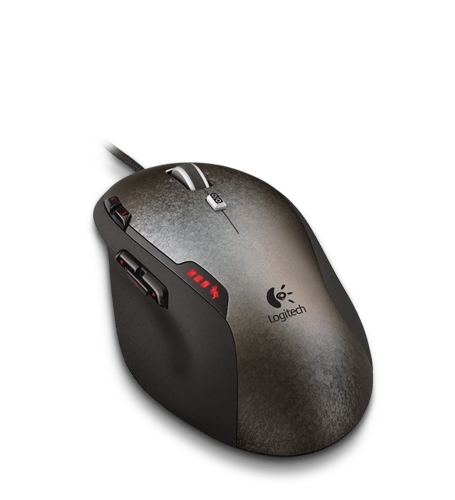
-
I love Logitech products but I actually find nothing wrong with the Microsoft OEM ones. Especially the cheap laser mice.

And I switch between a netbook/laptop keyboard to a full-sized keyboard to a natural ergonomic Microsoft everyday so I really no longer have any trouble. But I do prefer the ergonomic one for typing... it's ergonomic!
Most of my laptop accessories are Logitech, however. :P
-
UPDATE:
Package from Logitech showed up today with the wrong keyboard inside a K340!
I called the rep at Logitech and said he would make it right and sent a K800 out via 2 day air, I asked if he wanted to send a UPS label to return the wrong one, he said no keep it.
In the meantime I found some Logitech DiNovo's for the Mac on closeout at Amazon for $40 ( MSRP is $100 ) so I ordered a couple of them . More friggin keyboards than I know what to do with...
PS Def: Logitech Customer Support is located in Halifax NS

-
heh, wonder if that's the call center my mom works in...
-
My brand new Logitech keyboard was actually not such a great purchase. Half the keys didn't work, and to be honest I was a bit disappointed in it. But, I suppose anyone can crank out some lemons so I returned it to the store and bought a slightly more expensive keyboard/mouse combo that was now on sale for what I'd paid for the above one. I'm much happier now as not only is the new keyboard more comfortable, but all the keys work too!
This is the one I got:
http://www.logitech.com/en-in/keyboards/keyboard-mice-combos/devices/5875This is perhaps the most comfortable keyboard I've ever used.
Def
-
looks very similar to mine in design, apart from it being low profile, wireless, and not backlit. I've not really found any low profile keyboards that I actually like.
-
Yeah, I like the backlighting and wish this one had it. Also the LCD screen is not backlit so it's hard to see, but fortunately there's not really anything there that needs to be seen. I wish it had a clock on it.
Def
-
@Grant Lamontagne said:
Yeah, I like the backlighting and wish this one had it. Also the LCD screen is not backlit so it's hard to see, but fortunately there's not really anything there that needs to be seen. I wish it had a clock on it.Def
if it had the backlighting, it wouldn't be wireless... that or it would consume a lot of batteries...







Hello! It looks like you're interested in this conversation, but you don't have an account yet.
Getting fed up of having to scroll through the same posts each visit? When you register for an account, you'll always come back to exactly where you were before, and choose to be notified of new replies (either via email, or push notification). You'll also be able to save bookmarks and upvote posts to show your appreciation to other community members.
With your input, this post could be even better 💗
Register Login