
Windows 8 Beta
-
Thanks.... I am worrying a little about hardware more than software at this point, but I suppose that's something I should keep in mind as well.
Def
-
I also tried the consumer preview, and hated it.
-
I've got the release candidate (I have a full TechNet subscription).
Ironically, thanks to the new interface's love of touch input, it's easier to use on my MacBook (with its multitouch trackpad) than on a regular PC...
It's faster than windows 7 on the same
Hardware as its been heavily optimized for low power devices like tablets.I think it's like a really ugly puppy. Kinda likeable in a weird sort of way.
-
I need a new laptop but I'm waiting until 8 is officially released. Hopefully it will he manageable when it comes around.
Def
Sent from my MB860 using Tapatalk 2
-
Windows 8 is great on a touchscreen, works fantastically. It makes absolutely no sense on non touchscreens though imo. Why they completely removed the start orb option I have no idea, much more efficient than metro for a mouse and keyboard.
I'll stick with 7 until I can justify getting a touchscreen panel. Surface definitely interests me.
-
it looks fine for a tablet/phone/touch screen device, but my PC is none of those... pass, all hail Win7 as the new WinXP...
-
so I fired it up in a virtualmachine again... Ok so the desktop still looks very similar, but the initial "start" screen with tiles of programs is not. You access that by hovering the bottom left where the start menu button used to be... on the bottom right you get settings and some other menu type stuff pops out on a right side bar...
The "Start" "menu":
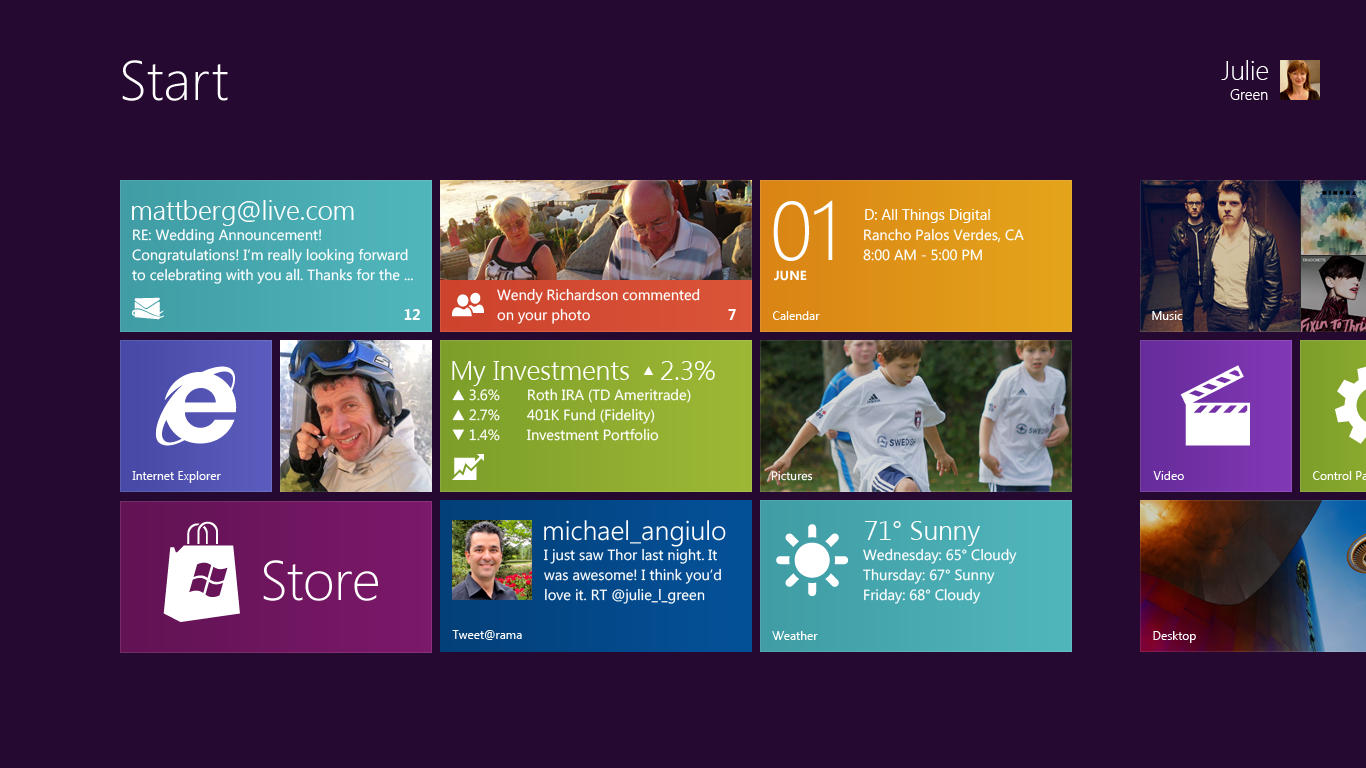
My bigger issue is the huge fonts/buttons and windows that pop up... if you're using IE in the fullscreen mode not desktop mode all the space they saved by making stuff high resolution is lost thanks to a huge URL bar at the bottom... which again on my phone/tablet would be acceptable, where my screen is running half FullHD resolution, but on my desktop? It's really un-necessary, and especially after they spent so much time reducing the size of things like the url bar and menus on browsers... however it does autohide...
Internet Exploder fullscreen:

imho changing tasks is cumbersome... hover bottom right, wait for menu to appear, click an icon...(but not the corner as you'll make the menu disappear and you'll have to wait for it to appear again... :ahhh) give me back an actual start menu and autohide taskbar thank you...
-
I am so glad I don't ever have to deal with any of that Winblows BS.

-
maybe Apple can do us all a favour and sue Microsoft as the Metro idea is clearly stolen from the iphone home screen or something... ::)
-
@Whoey said:
maybe Apple can do us all a favour and sue Microsoft as the Metro idea is clearly stolen from the iphone home screen or something... ::)The next iPad will inevitably have a metro home screen so that apple can sue Microsoft for preemptive copyright infringement :-)
It is bizarre that they appear to have made the desktop less functional in order to make tablets better though, strange strategy that one!
-
@Whoey said:
maybe Apple can do us all a favour and sue Microsoft as the Metro idea is clearly stolen from the iphone home screen or something... ::)Actually the exact opposite is true. Apple and Microsoft have a "do not copy" agreement. They go out of their way to make their interfaces different.
Windows 8 is a hybrid OS, designed for Hybrid devices - ie. a tablet that you have with you all day that docks to a base with some extra discreet hardware in it to operate as a full size system.
-
Strangely, my much older XP desktop computer is a lot more stable (generally and especially with IE) than my newer (a few months old) Windows 7 desktop computer...
And i use the XP systems for a lot harder and potentially destabilising tasks.I have not seen so many blue screens and explorer crashes since Win 95 (OK, slight exaggeration here)...
-
@dks said:
Strangely, my much older XP desktop computer is a lot more stable (generally and especially with IE) than my newer (a few months old) Windows 7 desktop computer...
And i use the XP systems for a lot harder and potentially destabilising tasks.I have not seen so many blue screens and explorer crashes since Win 95 (OK, slight exaggeration here)...

I have a laptop running the original xp install for 4+ years now and the home servers xp install was done on January 5th 2008 (that PC is on 24/7). No problems what so ever. I'm only running Win7 on my desktop and it has been fine till an MS security update messed it up. I had to delete 50+ updates manually till I found the bad one. :ahhh
The Win8, doesn't interest me at all, I saw a few Videos of it on Youtube and it looks dreadful. It's really like they're trying to make every second release to suck big time

-
Tried off and on in a virtual environment and it sucks. On a tablet or phone though it would be fine. Why?...
You could stay in tiled mode for many things and not have to swipe to get all your info at a glance. This is partly because during config you can input your account info and it crawls the webosphere and brings all the info to you. Clever for noobs and granny. Types like ME that use add blockers and so forth find this intrusive (illogical in some ways or even hypocritical I know). ANYWAY, being able to drop to a desktop on a tablet allows for additional uses not easy to do in a typical mobile OS.
For non-touch and where desktop content creation is the bulk of your day, the tiles are a crapload of crap that you will soon find annoying. I'll even go so far as to say the tiles will be annoying even if you DO have a touch screen. You will find yourself fighting the damn tiles and not using them opting to get to the desktop asap.
This screams of game ports where they take a console game and try to make it work on PC. Results are often crap as much of the UI is carryover from the console.
I suspect they are trying to have a single OS that works on multiple platforms. They are not alone - apple is doing it as is Google.
Final note that is positive: the two tablet options for OS they are planning is clever in that both can use Office. One is mobile cpu based the other is more traditional with "normal" office install. Docking creates an actual PC. Means you can be a creator not just a consumer
-
I have been accused by some members here of being an Apple 'fanboy', and I've responded that I'm not, and I have plenty of criticisms of how Apple does some things. IMHO, their attempts so far to integrate iOS and OSX are horribly wrong-headed. Some things that work well with a touch interface just don't translate well to the point-click desktop metaphor. For me, the most egregious example of this is how they're changed some basic functionality in OSX to try and make it more like iOS; the result is a more awkward, unintuitive, and inefficient way of doing things.
For example, as of 10.7, the "Save As" command has been removed from the OS and the included applications and the aftermarket ones like Pages, Keynote, etc., as well. This has caused no end of frustration for me. As a professor, I write or revise several lectures every week in Keynote. For continuity, I typically just open the last lecture and use that as the basis for the next lecture for the class by using the good old Save As command. But NO! Now, you have to open the old document, select "Duplicate", then save the duplicate under a new name, then go back and close the original document. Argh!!!
 This has caused me to loose work because I forgot to make a duplicate. Also, there's this new "Save a New Version" command, and the OS doesn't show separate documents for the different versions! You have to open the original to access the different versions.
Another example is how Spaces works in 10.7/10.8... when you invoke Spaces to move a window from one desktop to another, in the old version (10.6) all you have to do is drag the window you want from one Space to another and then click on the desktop you want to go to. But NO!!! not in 10.7/.8... If you want to drag a window from one desktop to another, you have to invoke Spaces, switch to the desktop the window you want is on, invoke Spaces again, drag the window to the desktop you want it to be on, then go to that desktop! This is infuriating to me!!! More steps, more complexity, less intuitiveness, and more chances to make a mistake.
Of course, does Apple listen to people like me? Even though I'm a professor and have a highly influential effect on my students, and I could just as easily tell them to NOT buy a Mac because of how Apple as screwed up the UI in OSX? No, of course not. After 6 weeks of 10.7 last fall, I gave it up. I backed up all my data, wiped my drive, and went back to 10.6. Hopefully, some developer will created a kernel extension to fix these design flaws, or come up with a better implementation of virtual desktops. But, short of that, I have no intention of going to 10.8, or any future version of OSX until Apple fixes these egregious flaws.
If they don't, and I'm dead serious here, my next computer will be a Hackintosh... I know several people who have them and while they do require more maintenance, the ability to be able to choose whatever hardware you want and set it up the way you want is very appealing to me. Or, I may just end up going to Ubuntu, or Free BSD with Gnome or Enlightenment. I've had it with this iOS integration bullsmurf... If they don't fix these problems, or at least allow people to do things the older, more efficient and intuitive way, Apple can bite my shiny metal a$$.
-
I'm running RTM Windows 8 Pro and Enterprise on my machines. A mix of touch and non touch. It's pretty cool. Super fast and always on connectivity. The Modern UI apps are a bit sparse but overall I think it's a pretty cool OS. just takes a little getting used to..
Sent from my HTC One X using Tapatalk 2





Hello! It looks like you're interested in this conversation, but you don't have an account yet.
Getting fed up of having to scroll through the same posts each visit? When you register for an account, you'll always come back to exactly where you were before, and choose to be notified of new replies (either via email, or push notification). You'll also be able to save bookmarks and upvote posts to show your appreciation to other community members.
With your input, this post could be even better 💗
Register Login


