
Self Sufficient computer repair and maintenance
-
This is a great, great thread; and just like to step in and thank you for this selfless contribution to help and share many cool wares.
- A while ago, I was also look a freeware to monitor a few in-home ip cams, I paid for an apps on my android phone called 'ip cam viewer' which does work wonder(very simple to set up, pretty much just choose the right model, type in the ip address and password, and it will work itself out)
I browsed thru the FAQ for Zoneminder, and it seems like it will work on linux, but anyway this or any recommend wares would work on PC as well? Anything simple that a layman like me can figure it out?
- I had been using a 1T backup removable harddisk to backup different data from different sources, and somewhere I probably copied some old, old files that is causing some disk problem--now everytime I plug that into an usb port, the PC kept reminding me:
"Do you want to scan and fix XXX HDD?
There might be a problem with some files on this device or disc. This can happen if you remove the device or disc before all files have been written to it.
Scan and fix (recommended)
This will prevent future problems when copying files to this device or dics.Continue without scanning"
However, if I choose "scan and fix", the little program just kept on running for a long time without ever coming up with an solution. Anything you do recommend to fix possibly broken files/folders in a removable harddisk?
Thank you in advance!


-
not sure of a windows solution that is good and free (I have not tested any personally) , but this might be a place to start
http://www.ispyconnect.com/ -
I use Windows only a little, but I know I have a Flash drive that does the same thing when connected to Windows. I just hit continue without scanning
-
Thanks Detron, I will be checking out the ispyconnect to see how it works. And in terms of the messed up files/folder, I am currently copying those files onto my PC, batch by batch, and like to see at what point this annoying message start to display. Then I will single out the files/folders that are giving me problems and see whether I could delete them for good. A very painful but hopefully fruitful process.
-
@detron said:
no problem, the Scan / don't scan does not bother me, because 95% of the time I am in Linux, and it does not complain, and everything works as it shouldMan, that just sounds like a dream...I knew I kept saying it for the past 15 years, but someday I gonna migrate to linux. That in itself is the biggest tips of all, Thanks!

-
I'm in Linux 95% of the time myself.
It's great when games I like actually work properly in Wine and I don't have to reboot :D
-
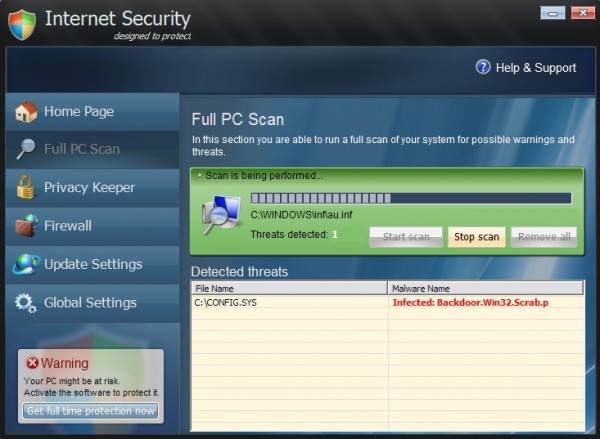
I inherited a Gateway NAV50 that had the "Internet Security" malware on it. The previous owner had no idea what was wrong and could do nothing with it. After some research I used the Windows System Restore and thought that was easy. However now the Windows 7 Starter software is not working right. It is extremely slow and the WiFi internet connection keeps dropping and it will not update when it does connect. Any ideas?

-
@stressmaster5000 said:
I inherited a Gateway NAV50 that had the "Internet Security" malware on it. The previous owner had no idea what was wrong and could do nothing with it. After some research I used the Windows System Restore and thought that was easy. However now the Windows 7 Starter software is not working right. It is extremely slow and the WiFi internet connection keeps dropping and it will not update when it does connect. Any ideas?here is a link I have used to help with this exact malware in the past
http://malwaretips.com/blogs/internet-security-virus-removalor just load Linux on it and be done!!
-
Detron, sorry about the edit, your link was broken, double "http://" in the url.
-
Well, as I mentioned the virus is gone by way of using System Restore but it is the Windows 7 Starter software that seems unstable now. I am attempting to use System Restore again and go back to start over but now even that is not working correctly. :(
-
sorry, I was in a hurry and did not read fully, however, I will see what I can do to help.
try this link first, and let me know if you get hung up anywhere
-
@detron said:
sorry, I was in a hurry and did not read fully, however, I will see what I can do to help.try this link first, and let me know if you get hung up anywhere
Hmm..
OK, I am looking at this but the biggest first hangup is I have no disk and the NAV50 is a net book type device with only USB port, and Ethernet port and some flash memory card reader. I have tried System Restore in safe mode and regular mode but each time now it fails. It still boots up but Firefox and Chrome does not work. IE works. The WiFi seems to stay online now. Know any place online I can get it scanned for free? What else to do?

-
sorry, I was in a hurry and did not read fully, however, I will see what I can do to help.
try this link first, and let me know if you get hung up anywhere
Hmm..
OK, I am looking at this but the biggest first hangup is I have no disk and the NAV50 is a net book type device with only USB port, and Ethernet port and some flash memory card reader. I have tried System Restore in safe mode and regular mode but each time now it fails. It still boots up but Firefox and Chrome does not work. IE works. The WiFi seems to stay online now. Know any place online I can get it scanned for free? What else to do?
Ok, I have a usb dvd drive, and I have a windows 7 recovery dvd, but that is little help to you at the moment. I will research how b or if I can put win 7 rescue onto a flash drive.
I will let youknow more once I have a plan.
If it comes to it, I will let you borrow the usb dvd drive
Sent from my SPH-L720 using Tapatalk
-
Was able to uninstall Firefox but not Chrome. Found some Gateway programs for restore but looks like you need a good clean backup to work with. I can't seem to get the Task Manager up either. Well I will work on it some more later tonight. Gotta go for now. Thanks for the suggestions and tips so far.
-
I think lots of those netbooks come with windows preinstalled and have a partition with the Windows installation/repair package hidden.
Maybe you could use that.
Here are a few options of recovering windows on netbooks. (It's for an Asus eeePC but the general idea is the same)
-
Thanks! I will look into that later tonight.
-
this looks very promising as well, and is for Gateway computers.
http://www.ehow.com/how_4865537_restore-computer-back-factory-settings.html


Hello! It looks like you're interested in this conversation, but you don't have an account yet.
Getting fed up of having to scroll through the same posts each visit? When you register for an account, you'll always come back to exactly where you were before, and choose to be notified of new replies (either via email, or push notification). You'll also be able to save bookmarks and upvote posts to show your appreciation to other community members.
With your input, this post could be even better 💗
Register Login


