3D Printer Blog
-
@Chako said:
I am still learning all the features of Cura. I at least figured out the best way to orient an object and to use the right support features. I am growing more and more confident. I still am clueless on the types of fill patterns however. I am off to see if there is a nice article explaining the difference between grid, line, triangle, tri-hexagon, cubic, cubic subdivision, octet, quarter cubic, concentric, zig zag, cross, cross 3D, and gyroid. :ahhhThis is what I read when I was doing similar research:
https://m.all3dp.com/2/cura-infill-patterns-all-you-need-to-know/ -
87% complete.
<a href="https://flic.kr/p/2j5FTzv" target="_blank" rel="noopener noreferrer"><img src="https://live.staticflickr.com/65535/49936163227_ebf015fffb_k.jpg" alt="banner" style="max-width: 100%; height: auto;" /></a>IMG_8515A by Chako, on Flickr
Edit: Just finished the part and had a little difficulty removing the support around the thread section. I did finally get it all off with a lot of picking, and even tried it with the spool nut it is designed to work with. I even tried the small dowels...and it all fits nicely. My only worry, I bought a set of 608 bearings off of Amazon. I just checked, and it tells me sometime in July to August for arrival?!?!
I am not sure I can wait that long to upgrade the spool holder. I might be forced to locally source them if I can. Time will tell. I do know that shipping it all out of whack right now.
-
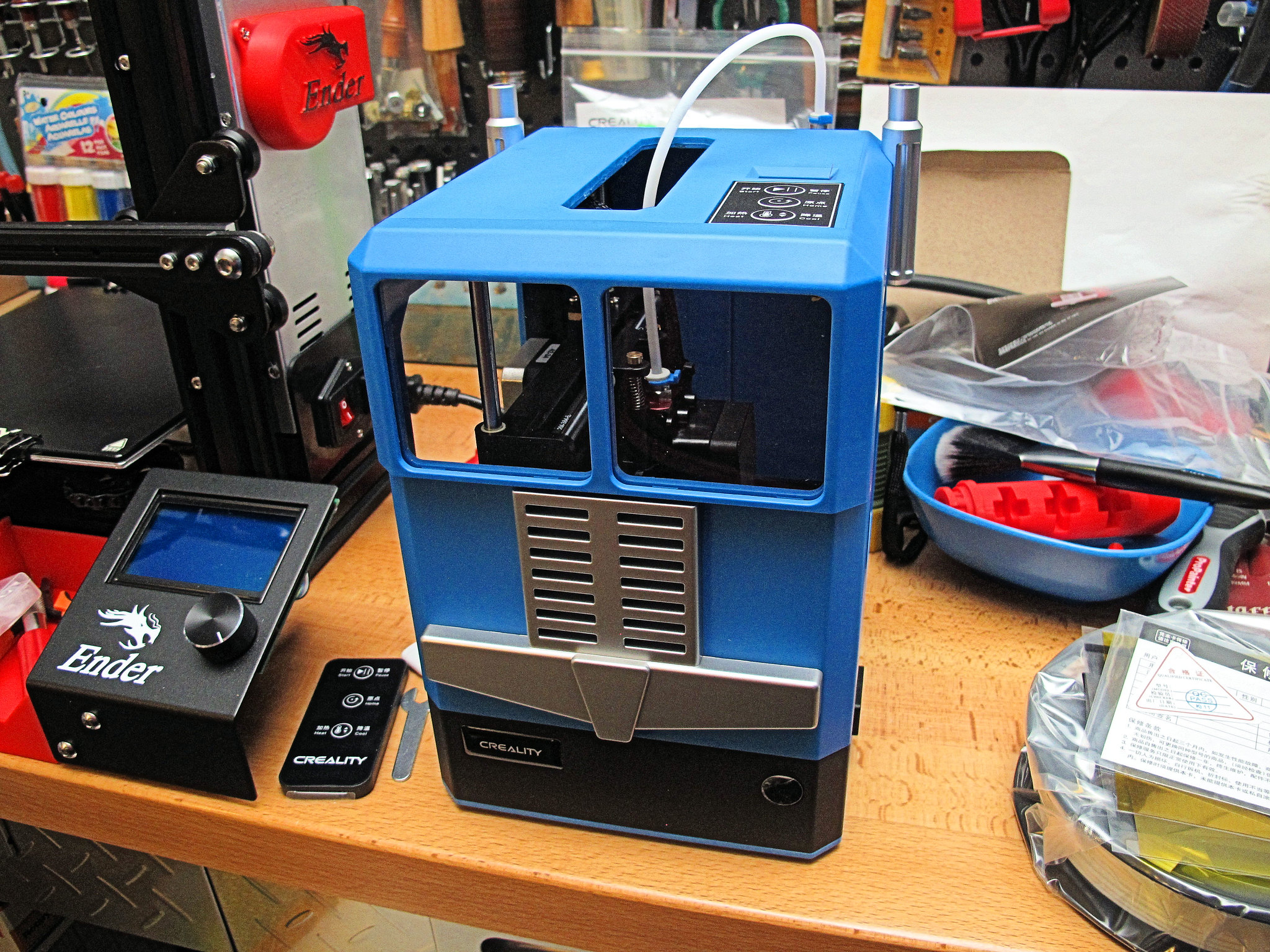
Got another package in today, and it is the second Creality printer I bought because I found it way too cute for its own good. Meet the Creality Cr-100, a printer aimed at children, and possibly adults that have never grown up. :D
Man, It is way smaller then I thought. The box is smaller than the Ender 3.
<a href="https://flic.kr/p/2j5Yeuz" target="_blank" rel="noopener noreferrer"><img src="https://live.staticflickr.com/65535/49939352013_8d93e88875_k.jpg" alt="banner" style="max-width: 100%; height: auto;" /></a>IMG_8516A by Chako, on Flickr
Designed to look like transport, it features a build area of only 100 x 100 x 80 mm. Auto bed leveling sort of, and no heated bed. The little bed is one of those magnetic removable plates, which is a good thing because my largish hands would have a difficult time fiddling inside this printer.
<a href="https://flic.kr/p/2j5YetN" target="_blank" rel="noopener noreferrer"><img src="https://live.staticflickr.com/65535/49939351968_5b265fa2e1_k.jpg" alt="banner" style="max-width: 100%; height: auto;" /></a>IMG_8517A by Chako, on Flickr
Surprisingly, it comes with a remote of all things. There is a 3 button touch pad on the top of the unit, along with a fairly small but coloured LCD display.
<a href="https://flic.kr/p/2j61SAh" target="_blank" rel="noopener noreferrer"><img src="https://live.staticflickr.com/65535/49939867036_7b6d676484_k.jpg" alt="banner" style="max-width: 100%; height: auto;" /></a>IMG_8519A by Chako, on Flickr
Here is a closer look at the removable build plate.
<a href="https://flic.kr/p/2j61SyJ" target="_blank" rel="noopener noreferrer"><img src="https://live.staticflickr.com/65535/49939866946_4f80dfe056_k.jpg" alt="banner" style="max-width: 100%; height: auto;" /></a>IMG_8520A by Chako, on Flickr
I am going to install the spool tomorrow and play with it. I do note a few things. I guess I can upgrade the extruder to a metal on as it is the same one used on the larger Ender 3. I also noted that there are several printable spools as this one will not accept 1KG rolls of filament. Another surprise, they have included a full roll of white...just not sure if the roll is 500g or 250g, either way, it is more generous that what came with the Ender 3...which I estimate to be around 15g of filament.
This is a petite 3D printer. Smallar than I thought it would be. Very cute though. I thought I had bought a red unit..but I think I much prefer the blue now that I have one to look at. So there you have it, my second 3D printer.
- YouTube
Auf YouTube findest du die angesagtesten Videos und Tracks. Außerdem kannst du eigene Inhalte hochladen und mit Freunden oder gleich der ganzen Welt teilen.

(www.youtube.com)
-
OMG Vidar! I am struggling very hard in not doing that right now.

The CR-100 looks better in person. It has a nice weight to it, and the build quality is up there. I have no clue about the remote other than to keep little fingers away from danger. However, the cute little colour LCD is top of the unit, and the IR sensor is located in front of the unit.

-
I would have wanted the red one... optimus prime style...
-

this one...
-
Found a problem...and I looked online for a solution, and just finished emailing Creality. I was about to play with the little CR-100 in Cura when I found out it did not have a profile. I looked at all the electronic files that came with the printer's micro SD card...and all I could find was info for a CR-10 which is a totally different printer. I played around with Cura and figured out where I could make a custom profile, but I do not have all the parameters. I know the build size is 100 x 100 x 80 mm, and that the nozzle is 0.4, and that is about it. I have no clue on start stop parameters, X,Y, and Z settings, etc., I couldn't find anyone online with the info I needed. I emailed Creality and see if they will respond.
-
@Chako said:
Found a problem...and I looked online for a solution, and just finished emailing Creality. I was about to play with the little CR-100 in Cura when I found out it did not have a profile. I looked at all the electronic files that came with the printer's micro SD card...and all I could find was info for a CR-10 which is a totally different printer. I played around with Cura and figured out where I could make a custom profile, but I do not have all the parameters. I know the build size is 100 x 100 x 80 mm, and that the nozzle is 0.4, and that is about it. I have no clue on start stop parameters, X,Y, and Z settings, etc., I couldn't find anyone online with the info I needed. I emailed Creality and see if they will respond.Creality have their own slicer? (I have no clue, but I do see this: https://www.creality.com/u_file/1911/photo/e0840a8e91.png. That, whatever it is, has a CR-100 profile it seems?
-
Ok. I decided to install the slicing software included with the CR-100, even though it is a far older build of Cura modified by Creality. Lo and behold, there is a CR-100 profile included with this. After using the most current version of Cura, I am not really liking this older interface. Cura 4.6.1 is far more polished than this 1.3 Creality version. Now, I have dug deep into the Creality slicer and am trying the included lion file for now. Better yet, I have dug into the various aspects of the slicer and found a lot of info that I could possibly transplant into Cura 4.6.1 I will look into this as a possible custom profile. Ideally I would rather use one piece of software for both printers.
Got the first print going...
<a href="https://flic.kr/p/2j6iDD6" target="_blank" rel="noopener noreferrer"><img src="https://live.staticflickr.com/65535/49943140371_8bea47b644_k.jpg" alt="banner" style="max-width: 100%; height: auto;" /></a>IMG_8522A by Chako, on Flickr
Non heated bed...so rafts are the thing I guess.
<a href="https://flic.kr/p/2j6g3k6" target="_blank" rel="noopener noreferrer"><img src="https://live.staticflickr.com/65535/49942631363_2657e1ab97_k.jpg" alt="banner" style="max-width: 100%; height: auto;" /></a>IMG_8525A by Chako, on Flickr
I now feel much better about possibly having a profile for the CR-100. I did email 2 places...and will see what the response will be if they respond.
EDIT: Vidar, both on the same page at the same time.

-
A few first impressions as it prints. the nozzle heats up quicker than that of my Ender 3. The printer is much quieter in that the extruder fans aren't as loud. The stepper motors are about as loud as that of the Ender 3. I will have to print a larger spool for this machine. Not sure why they only allow smaller filament spools on this thing. The printer came with 200g of white filament. The spool holder will not fit a 1Kg spool...but there are a few mods I found over at Thingiverse that will fix this issue. Still a really cute looking printer. I bought this to see if it might make a good classroom printer. Noted they use the same plastic filament feeder mechanism as on the Ender 3. I might have to get myself another all metal kit to upgrade this. I have seen online photos of wear and tear of plastic parts that eventually get eaten by the filament. The metal kit prevents this from happening.
Still a bit surprised that the current Cura 4.6.1 does not have a built in CR-100 profile. This tells me that the little cute printer might not be selling all that much.
-
@Chako said:
First print was a failure. I didn't clean the bed with my alcohol wipes. Noticed the raft was actually designed with little contact on the bed. Going to play with the settings tomorrow if I get the chance. What did print was good, but it let go about half way to completion.I've never tried a non-heated bed, but I imagine that might come with some challenges too.
I've made lots of half-prints, messy prints and random treaded nests. Until the settings are right (if ever) that comes with the territory. (I think some 3D printer and material manufacturers have some curated settings that should work for their combination).
I generally prefer the resin printer. :D
-
Creality stating that the CR-100 has auto bed leveling is a BIG FAT LIE. I just attempted another print and I could tell right away that the nozzle is extruding too far away from the build plate resulting in an immediate lifting of the raft on the model. I took a gander at the instructions once again and noted that the nozzle assembly is on a spring loaded gantry, and that there is an adjustment screw for the gantry...however the access hole is covered by the filament spool. I gather I will have to adjust the screw with a piece of paper between the bed and the nozzle. Can't adjust 4 corners like the Ender 3. Little written in the instructions about leveling this printer. So much for being a "kids" easy to use printer right out of the box with auto leveling. The CR-100 is harder to adjust and is not as user friendly as the Endeer 3...go figure.
-
@Don Pablo said:

Sounds like a case of the cheap stuff needing more tinkering? :(
I've always found this entire leveling thing, automatic or not, as an indication that 3D printers don't have the best structural solutions. Other machines that needs their worktables to stay level seem to manage that just fine - set once and forget. Well, I guess expensive 3D printers don't have that issue either. Likely a cost thing.




Hello! It looks like you're interested in this conversation, but you don't have an account yet.
Getting fed up of having to scroll through the same posts each visit? When you register for an account, you'll always come back to exactly where you were before, and choose to be notified of new replies (either via email, or push notification). You'll also be able to save bookmarks and upvote posts to show your appreciation to other community members.
With your input, this post could be even better 💗
Register Login